Intersection
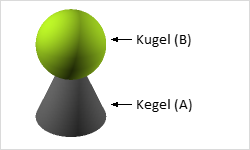
Using the Intersection function (Edit tab, Construction group), the volume portions of multiple bodies that penetrate each other are retained, meaning the portions that these bodies have in common remain.
First, select an object for which you want to form the intersection (A)
Switch to the Edit tab and click the Intersect command
Then click on the second body (B).
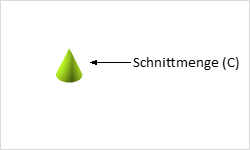
In the result, the congruent volume portions of the bodies or the congruent surfaces — meaning their intersection — remain. All protruding surfaces and volumes are removed (C).