
Gift review
To evaluate an entire shelf, the desired shelf is selected in the first step. Now, in the shopfitting tab, the item Evaluation: Shelf selected. An evaluation of the shelf will now be performed automatically. Once it is complete, a window will open listing all products in the shelf with their properties.

Overview Evaluation
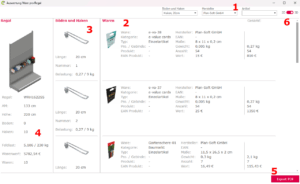
- Filter: Here, goods can be filtered by manufacturer, shelves/hooks, or item.
- Goods: Overview of goods on the shelf.
- Shelves/Hooks: The respective shelf/hook and its properties are displayed here.
- Shelf: Preview of the shelf with complete merchandise value, weight, and number of items.
- Here a file can be provided for export.
- Preview switch: This is where the shelf preview is set.