
Creating a 360° Panorama
- Select a perspective viewport
- Click in the tab View under the camera, on the middle square of the 3x3 image
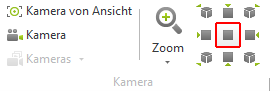
- Go to the register Presentation on Picture
- In the render window under Type, choose Panorama Australia
- SizeSet the image resolution (the larger, the more details)
- Renderer, OpenGL or OSPRay
- OpenGL, very fast, less realistic
- OSPRay, slower, but photorealistic
Once all settings have been made, click the green play button to start the rendering.
Ways to present a panorama
Impress
Using the internal program service Impress, you can present the panorama online.
A Dropbox, Google Drive, or Microsoft OneDrive account is required to host the file.